Orders & delivery
Returns and exchanges
Parcels the customer refused, items returned after delivery, partial returns, refunds and size exchanges.
Who it is for:OwnerManager
On this page
There are two kinds of returns in online selling: the customer refuses the parcel at the door, or they send items back after delivery (wrong size, damaged, changed their mind). Taking returns is a manager's or owner's job.
Refused parcel (whole order back)
- Courier orders: when the courier reports the parcel returned, the order is marked returned by itself.
- Your own rider: open the order and click Returned by customer, then answer Why was it returned?
Either way the invoice is voided and the stock comes back (Returned: stock restored). The order moves to Cancelled / returned and counts against that phone number's history, which feeds the fake-order risk.
Return after delivery
When a delivered order's items come back:
- Find its invoice in Orders › Sales history (every confirmed order has one) and click Return.
- For each item, type the Return qty (you can return some of the items, not all) and choose Restock to put it back on sale, or Damaged / expired to keep it out of stock.
- Add a Reason (optional).
- Under Give back as choose Refund money (and from which account) or Reduce the customer's due. Tick Also give back the delivery charge if it was your mistake.
- Click Save return.
If the sale is older than your return window, you see This sale is older than the …-day return window; a manager can still take it. The window is set in Admin › Settings.
Size or colour exchange
The simplest way for an online exchange:
- Take the returned item back as above, giving back the value as Reduce the customer's due or a refund.
- Make a new order for the replacement in Orders › New manual order, with the tag
exchangeand a note, and book the courier as usual.
The Exchange for other items option on the return page opens the Showroom POS with the returned value as credit; use it when the customer comes to your showroom.
The returns list
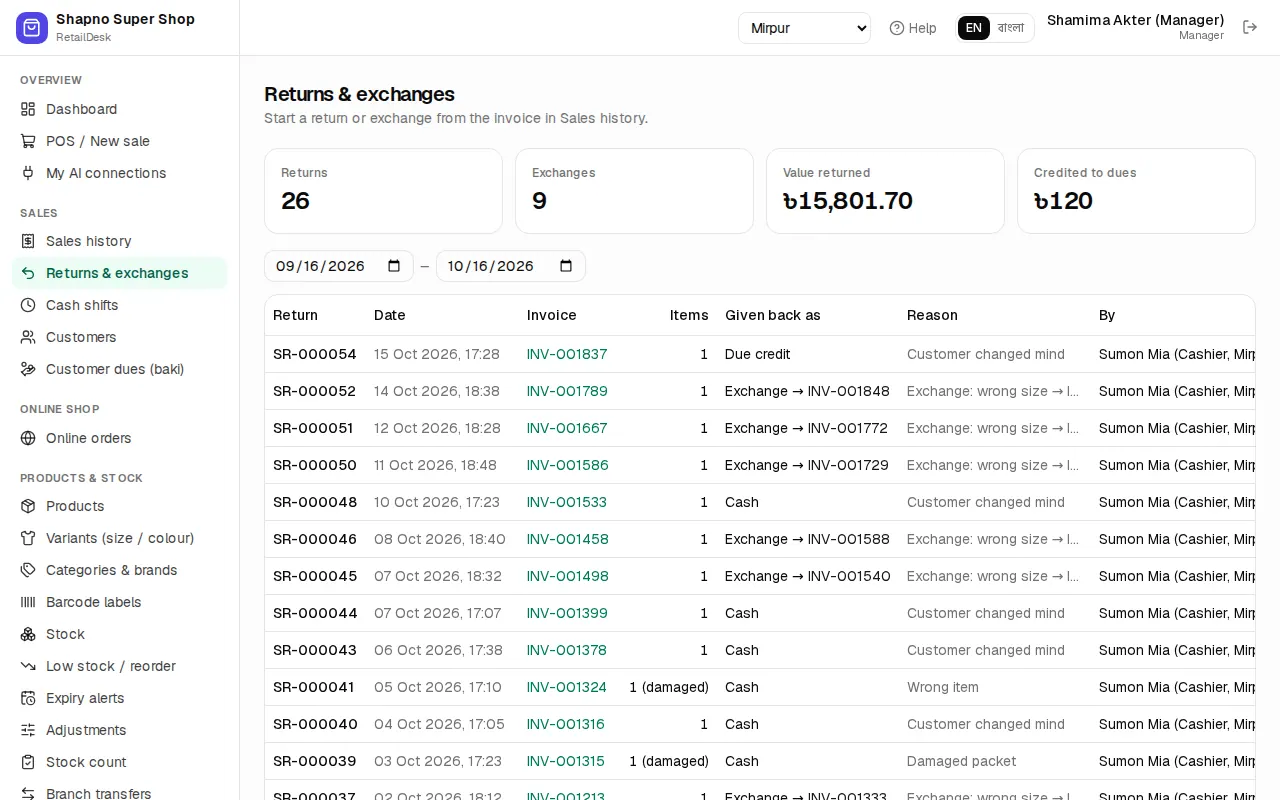
Orders › Returns & exchanges lists every return with its Date, Invoice, Items, Reason, Value returned and how it was Given back as.